WMS vs ERP: what each does and how they work together
BlogAt a glance
An ERP keeps the records for orders, inventory and finances; a WMS runs the work inside the warehouse and posts each result back to the ERP.
Talk to us about your ERPSee the ERPs TouchPath connects to
One customer order
ERPWMS
ERP
WMS
Order 1042
Released to the warehouse
Order sent
Pick list
Sent to a handheld
3 of 3 lines
Picked and loaded
Result posted
Shipment posted
Stock and the order updated
ERP
Enterprise resource planning
A company’s system of record for its orders, inventory and finances.
The question it answersHow much do we have, and what is it worth?
WMS
Warehouse management system
Runs the work inside the warehouse, from where each item sits to which task comes next.
The question it answersWhere is it, and who moves it next?
Connected
The WMS directs the floor and posts each result to the ERP, so the ERP stays the system of record.
System of recordDesks and offices
What an ERP does
An ERP, or enterprise resource planning system, holds the records the whole business runs on. Every department works from the same data in it, which is why it is called the system of record.
-
Orders
Sales orders, purchase orders and shop orders (production orders), from entry to invoice.
-
Items and bills of material
What each product is made of, and how it is costed.
-
Planning
Material requirements planning (MRP) works out what to buy and make, and when.
-
Inventory
How much of each item the company holds in each warehouse, and what it is worth.
-
Finance
Product costs and the general ledger.
In manufacturing, long-established ERPs such as Infor ERP LX and BPCS on IBM i keep these records at many plants.
Runs the floorHandhelds and trucks
What a WMS does
A WMS, or warehouse management system, runs the physical work in the warehouse. It knows what is in every location, down to the lot. It also directs the work, telling each person which pallet to move or which location to pick from next. For a fuller picture, see what a WMS is and the functions of a WMS.
-
Receiving
Checking each delivery against its order and recording the lot.
-
Putaway
Choosing a location for each pallet by rules, then confirming it with a scan.
-
Replenishment
Refilling pick faces from reserve stock before they run out.
-
Picking and shipping
Sending pickers to locations in route order, then loading the right truck.
-
Counting
Cycle counts by location, with differences reviewed before they post.
WMS vs ERP side by side
The two systems overlap on inventory, which is where most of the confusion comes from. The ERP knows how much of an item the company has and what it is worth. The WMS knows where it is, down to the location and the lot.
Neither replaces the other. Many ERPs include basic warehouse functions, and a WMS needs the ERP’s items and orders to know what to do.
|
ERP System of record |
WMS Runs the warehouse |
|
|---|---|---|
| Inventory | Quantity and value of each item, by warehouse | Which location and lot, right now |
| Who uses it | Planners, buyers, customer service, finance | Receivers, forklift drivers, pickers, supervisors |
| Time scale | Plans for the coming days and weeks | The tasks of the current shift |
Three more differences
Main job
ERPPlan the business and keep its records
WMSRun the work in the warehouse
Orders
ERPTakes them in and bills them
WMSGets them picked and shipped
Where it is used
ERPDesks and offices
WMSHandheld scanners, vehicle-mounted units, label printers
How a WMS and an ERP work together
Pick an event to see which system does each step, and what passes between them.
WMS to ERPStep 5 of 5
Receipt posted. The WMS posts the receipt, and the ERP updates on-hand stock and the open order.
What passes between a WMS and an ERP
Data moves in both directions. From the ERP, the WMS gets the items and the open orders it has to work on. In return, the ERP gets the results as transactions, such as receipts, moves, issues to production, shipments and count adjustments.
ERP
Owns
Items and orders, and the value of the stock
From the ERP to the WMS
ItemsOpen orders
From the WMS to the ERP, as transactions
ReceiptsMovesIssues to productionShipmentsCount adjustments
WMS
Owns
Locations and tasks
Results post as they happen
When results post as they happen, the ERP stays current, so its plans and ship dates start from what is on the floor now.
One rule keeps the records straight
ERP owns
The items and orders, and the value of the stock.
WMS owns
The locations and the tasks.
Each piece of data has one owner, and is edited only in the system that owns it.
Do you need a WMS if you have an ERP?
Not always.
-
A small warehouse
Few locations and no lot control can run well on the ERP’s own inventory functions, as long as pick lists are keyed in the same day.
-
A growing floor
A WMS starts to make sense as the floor work grows. The common signs are in the checklist.
Each of these signs is a gap in how the floor records and directs its work. The ERP stays the system of record, and a WMS feeds it accurate, current data.
Which of these sound like your floor?
Select the signs that match your floor.
WMS and ERP in manufacturing
In a plant, the warehouse also feeds production. Raw materials are received and stored, then delivered to the line against shop orders. Finished goods come off the line to be labeled and put away until they ship. Each of those moves is a transaction the ERP needs for stock and costing, and for the next plan.
WMSWhere the material went
ERPWhat it cost, for stock, costing and the next plan
-
1Received and stored
WMS
The receipt and its location
ERP
Stock and its value
-
2Delivered to the line
WMS
The issue to the shop order
ERP
Material cost on the order
-
3Off the line and labeled
WMS
The finished lot and its label
ERP
Finished goods and their cost
-
4Put away until it ships
WMS
The putaway location
ERP
Stock ready to ship
Whether material use is recorded at each issue or by backflushing, the WMS records where the material went, and the ERP records what it cost.
A food plant and its ERP on the IBM i
Many manufacturers run a long-established ERP, often on IBM i. A WMS that connects to it adds control on the floor, and the ERP stays the system of record.

Food manufacturerERP on IBM iReceipt and putaway recorded
Two critical requirements, both achievedIntegration into the ERP, and work that goes on when the iSeries is unavailable
“Integration into the ERP and the ability to operate when the iSeries is unavailable were two critical requirements, and both were achieved painlessly.”
Manager of Business Systems, food manufacturer
A food manufacturer making coatings and seasonings needed inventory tracking integrated with its ERP on the IBM i, updating transactions in real time as people on the floor performed them. Production receiving moved to pallet by pallet, with both the receipt and the putaway recorded.
WMS and ERP with TouchPath
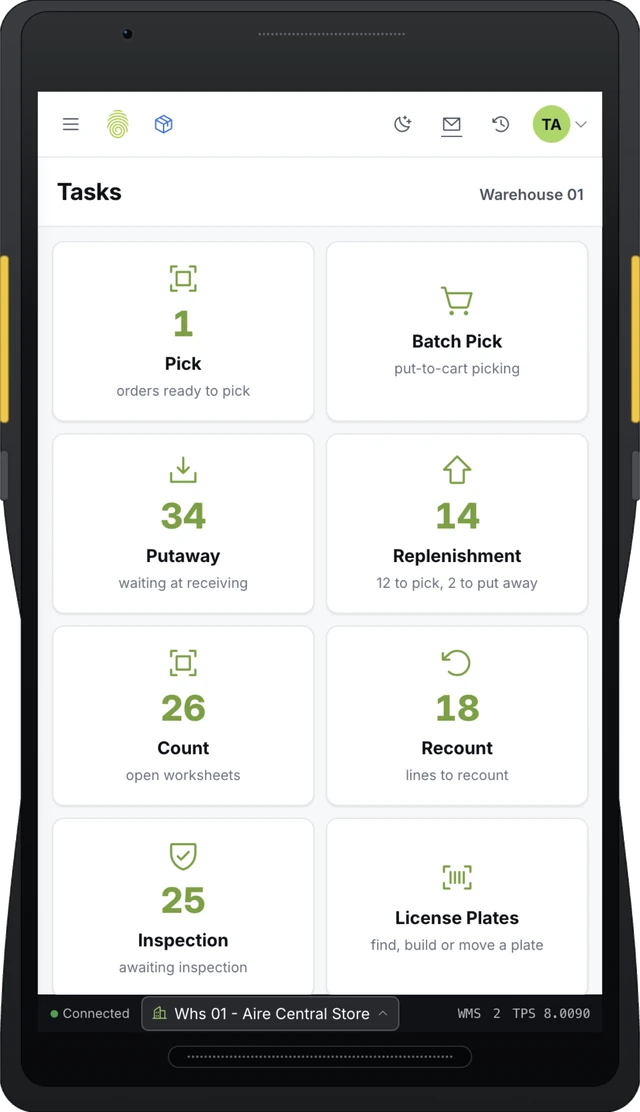
TouchWMS runs the warehouse and TouchInventory tracks stock on the manufacturing floor, and both connect to the ERP. TouchPath’s deepest integration is with Infor ERP LX and BPCS on IBM i, in both directions. If the ERP is down, transactions wait in a queue and post when it returns.
LX and BPCS on IBM iBoth directionsQueued if the ERP is down
Product
TouchWMS
Warehouse management with directed putaway and replenishment, connected to the ERP.
See TouchWMS
Integration
ERP LX/BPCS integration
iEnabler brings ERP changes in over IBM i data queues, and the iServ Adapter posts floor transactions back.
See the integration
Integration
All ERP integrations
The ERPs TouchPath connects to, and how each connection works.
See all integrations
Related guides: barcode data collection, FIFO vs FEFO and warehouse management for distribution centers.
Want the floor and the ERP in step? Tell us how they connect today.
Tell us which ERP you run and how warehouse transactions reach it today, and we will walk you through how it would work.
Back to News