
TouchCount: continuous cycle counting
TouchCount is everyday, continuous cycle counting software: it counts live inventory with no production stoppages and posts the results to your ERP.
- Counting never blocks the warehouse: putaway and picking carry on during a count
- Blind, scan-verified counts that cannot be skipped, with found items and empty locations recorded
- Variances can go automatically to a recount, then to supervisor review
- Approvals with spending limits, and inventory accuracy reporting for auditors and finance
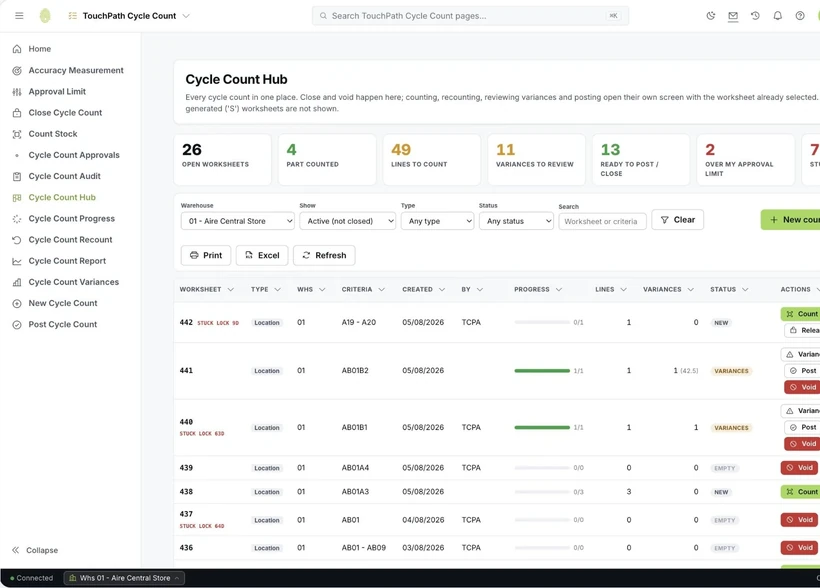
TouchCount on screen
Every count runs from one hub, from opening the worksheet to posting it.
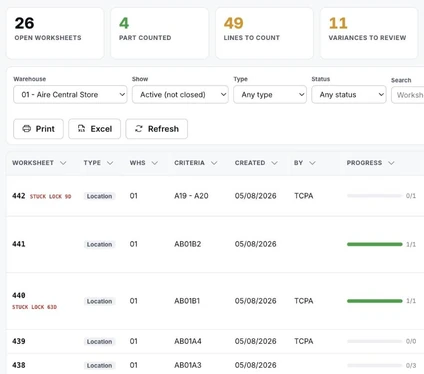
Tiles flag what needs action
Each kind of open work has its own tile, from lines still to count to variances waiting for review.
Counts are not pre-filled
Quantity boxes start blank. On a handheld they stay locked until the item is scanned.
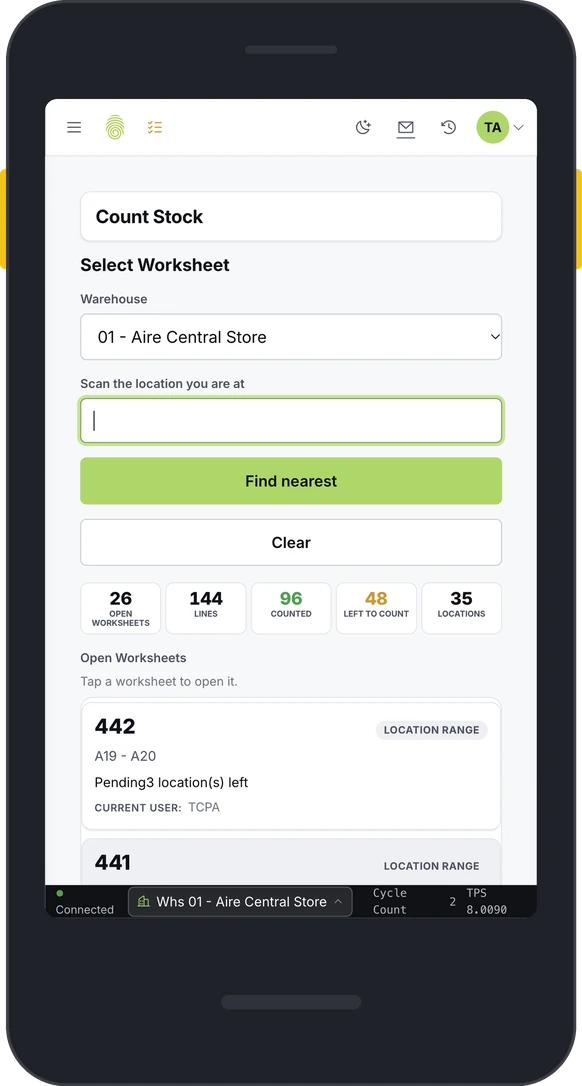
Scan-first counting
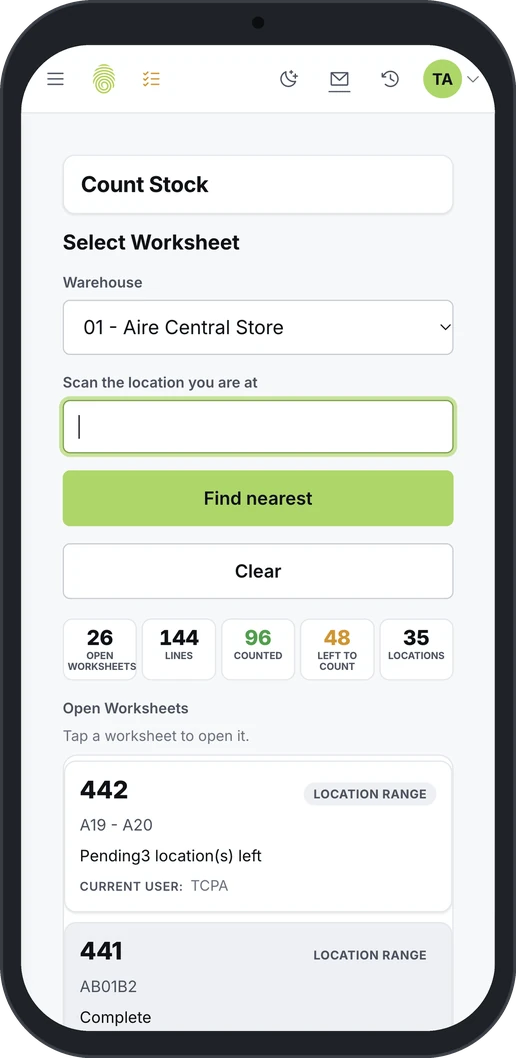
Counters scan where they are and see the nearest counts in walk order. Then they scan the location and the item.
Built for any device
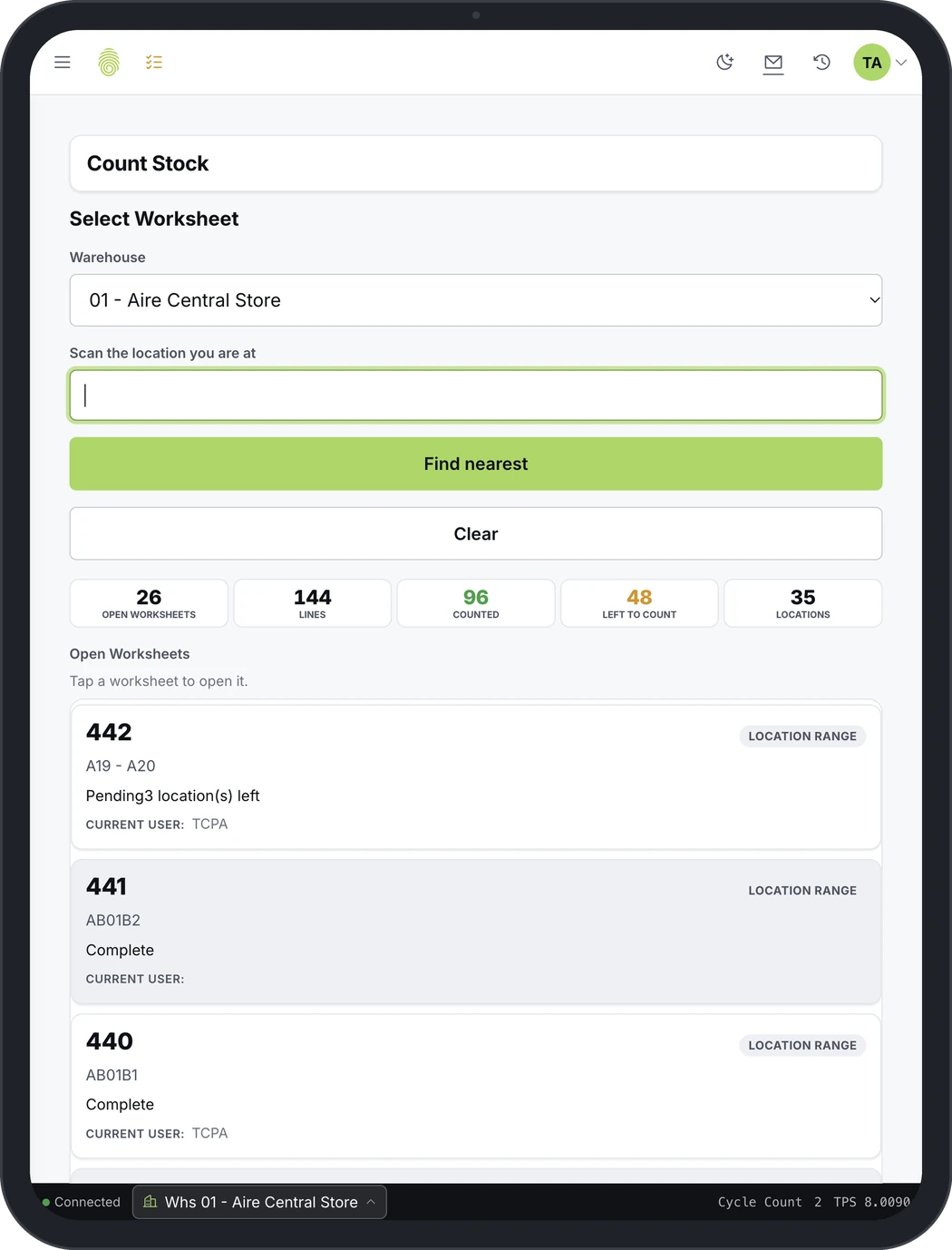
Counting runs the same way on a rugged scanner, a tablet or a phone, in the browser and in over 20 languages. Counters scan the location they are at, and the nearest open counts come up in walk order.
- Runs in the browser on
- Android
- Windows
- iOS
Progress before the first scan
The screen opens with the totals for open worksheets, lines counted and lines left to count.
Worksheets by location range
Each open worksheet shows its location range, the locations left and who is counting it.
One tap from the home screen
Cycle count has its own tile on the handheld home screen.
Every warehouse in one view
Supervisors can switch the hub to an all-warehouses view.
Counting never blocks the warehouse
TouchCount counts live inventory while the warehouse runs. Only the count worksheet locks: putaway and picking carry on during the count, so there are no production stoppages.
It can be set up to match how your team counts, so warehouse staff can use it after minimal training. It runs on an existing browser, so it is quick to install, integrated or standalone.
One row of locations, during a count
- A-01Putaway
- A-02Open
- A-03Counting
- A-04Picking
- A-05Open
- A-06Putaway
- A-07Open
- A-08Picking
How a TouchCount count works
-
Generate the worksheet
Cycle count worksheets can be generated by location range, item, product class, or zero-stock locations.
-
Count the location
The count is blind, and it handles found items (not expected in this location) as well as verifying empty locations.
-
Review the variances
Variances can go automatically to a recount, then to a supervisor or manager for review. Each facility can make recounts mandatory and set a value, so only variances above it are recounted. Variance reports show the cost of each variance.
-
Post to the ERP
Accepted variances are posted to the ERP or WMS with the appropriate transaction type and reason code. Each approver has a spending limit: lines within it post right away, and lines over it wait for someone with a higher limit. Before posting, TouchCount warns if a count would leave stock promised to customer orders without enough on hand.
-
Keep the audit trail
Every count and variance posting is logged with who, what, where and when, a rejection keeps its reason, and the last counted date by location gives auditors proof of counting. TouchCount also reports inventory accuracy and tracks counts against each ABC class’s counts-per-year target. Its audit report puts first and second counts side by side and exports.


TouchCount at a glance
| Counting | Everyday and continuous, with no production stoppages |
|---|---|
| Worksheets | By location range, item, product class, or zero-stock locations |
| Count method | Blind; records found items and verifies empty locations |
| Variances | Automatic recount, then supervisor review; each one costed |
| Approvals | Spending limits: lines within a limit post right away; the rest wait for a higher limit |
| Posting | To the ERP or WMS, with transaction type and reason code |
| Audit trail | Who, what, where and when, with the reason for any rejection |
| Reporting | Inventory accuracy, and the last counted date by location |
Counting inventory without stopping the floor? Tell us how you count today.
Tell us which ERP you run, how your warehouse works and how often you count today, and we will walk you through how it would work.